
TimeZero PC Radar Solutions for Computer-Based Marine Navigation
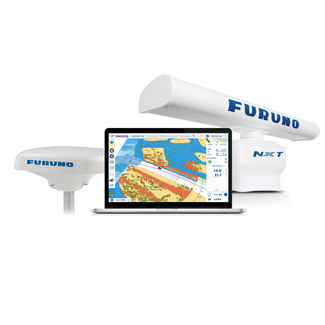
TimeZero PC Radar solutions are designed for boat owners and professionals who want to use radar directly within a computer-based marine navigation setup. These solutions combine TimeZero navigation software with compatible Furuno radar equipment, digital charts and PC-based control, allowing radar, charting and route planning to work together from one navigation environment.
This makes TimeZero PC Radar especially useful for users who want a larger, more complete workspace than a standard helm display can offer. Radar, charts, routes, waypoints, AIS data, currents and weather information can be managed from the same computer-based interface, helping the user plan, monitor and react with more confidence.
For many users, TimeZero PC Radar also works as a valuable backup navigation solution. It gives the boat an additional radar and charting workspace alongside the main helm displays, useful when the primary display setup is already in use, too limited for detailed route monitoring or unavailable.
The practical advantage is clear: radar is not isolated from the rest of the navigation picture. With radar overlay on digital charts and access to radar controls such as Gain, Sea Clutter and Rain Clutter, TimeZero PC Radar helps users compare radar returns with chart data and interpret their surroundings more clearly.
Why choose a TimeZero PC Radar solution instead of a standalone radar?
A TimeZero PC Radar solution is often the better option when the user wants radar to be part of a full computer-based navigation system. While standalone radar is ideal for users who want a dedicated radar screen, PC radar is designed for users who want radar, charts, planning tools and navigation data inside one software platform.
The main advantages of TimeZero PC Radar include:
- Radar display directly on your computer
- Radar overlay on digital charts
- Route planning and waypoint creation
- AIS, weather and current data in the same navigation environment
- Control over radar settings such as Gain, Sea Clutter and Rain Clutter
- Integration with compatible Furuno DRS radar antennas
- Connection to a Furuno NavNet navigation network when required
For many users, this is the key difference: the radar image becomes part of a complete navigation workflow, not a separate instrument that needs to be interpreted on its own.
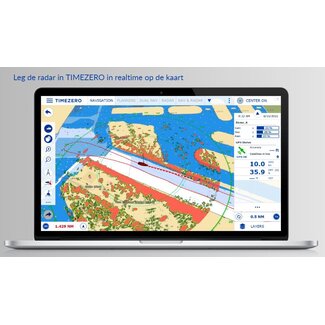
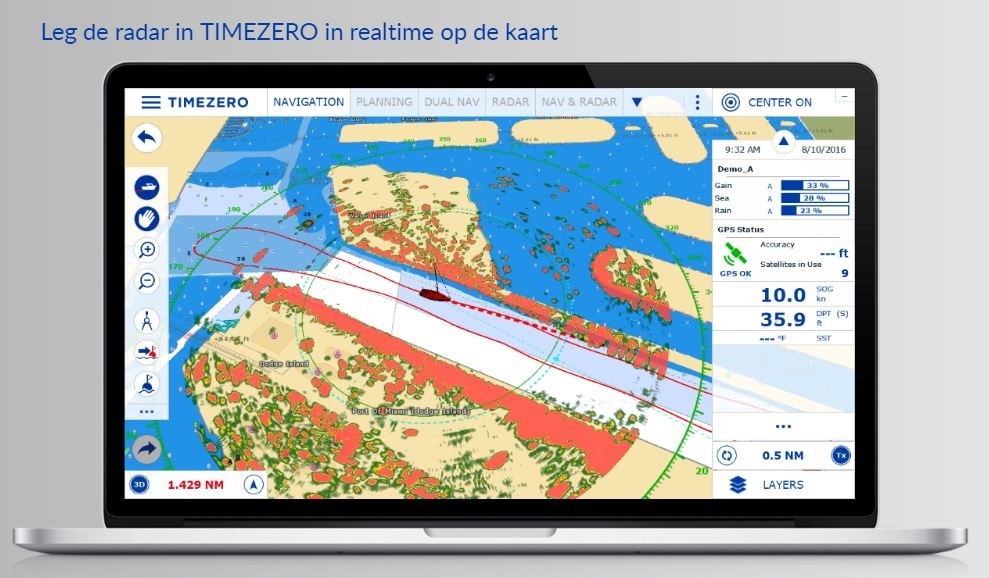
A PC-based radar setup is easier to understand when you see the workflow on screen: radar, charts, route planning and navigation data are managed from the same TimeZero environment, helping the user compare radar returns with the wider navigation picture.
How does radar overlay improve navigation on a computer?
One of the strongest benefits of TimeZero PC Radar is the ability to overlay the radar image directly on the digital chart. This helps the user compare radar returns with charted land, buoys, coastline, fixed objects and AIS information.
This is especially useful when navigating in:
- Low visibility
- Night conditions
- Busy coastal waters
- Harbour approaches
- Areas with buoys, land returns and fixed obstacles
- Route planning and monitoring situations
- Professional or advanced recreational navigation setups
Radar overlay can make interpretation faster because the user does not need to mentally compare a separate radar screen with the chart. Instead, radar targets appear in the same visual context as the planned route, chart data and other navigation information.
TimeZero PC Radar for Inland Waterways, Rivers and Coastal Routes
TimeZero PC Radar is especially valuable for boat owners navigating inland waterways, rivers, canals and coastal routes, where the challenge is not only seeing what is ahead, but comparing several navigation signals quickly and clearly. In these environments, traffic, bridges, locks, buoys, banks and narrow passages can make the navigation picture more complex than it first appears.
This is where a PC-based TimeZero setup becomes useful: it brings radar overlay, digital charts, AIS data, route planning, weather and currents into one larger workspace. Instead of checking each source separately, the user can compare what the radar detects with what the chart, AIS and route data suggest.
This can be particularly useful for:
- inland shipping routes, where space is limited and traffic can be dense
- rivers and canals, where banks, bridges and fixed objects need clear interpretation
- coastal navigation, where weather, visibility and moving traffic can change quickly
- recreational boats and professional vessels that want an additional navigation layer alongside the main helm display
For more information, we recommend reading our blog: A Second Navigation System: A Smart Backup Solution.
What is Smart Radar mode in TimeZero?
Smart Radar mode is one of the most useful features of the TimeZero PC Radar environment. It uses nautical chart information and AIS data to help distinguish known radar returns from unknown or unmarked targets.
In practice, this means the system can help reduce the visual attention spent on expected returns, such as land, buoys or AIS-identified vessels, so the user can focus more clearly on objects that may need closer attention.
Smart Radar mode is especially valuable when:
- The screen contains many radar returns
- The user is navigating close to land or harbour structures
- AIS and chart data are being used alongside radar
- There may be unmarked or unexpected objects nearby
- The operator wants to focus on unknown targets more quickly
The value is not only that TimeZero shows radar on a PC. It helps turn radar, AIS and chart data into a more intelligent navigation picture.
Which equipment do you need for TimeZero PC Radar?
A TimeZero PC Radar setup requires more than software alone. The system must be built around compatible hardware and correct network integration.
The main components usually include:
- TimeZero navigation software
- A compatible TimeZero radar module
- A compatible Furuno radar antenna
- Digital charts
- Ethernet connection
- Compatible computer setup
- Optional connection to a Furuno NavNet network
- AIS, weather or current data depending on the navigation configuration
This is important because PC radar is not the same as simply opening an app on a laptop. It is a structured navigation setup where the software, radar module, Furuno antenna and network connection need to work together correctly.
Can TimeZero PC Radar work with Furuno NavNet and DRS radars?
Yes. TimeZero PC Radar can be connected to compatible Furuno DRS radar antennas and can also connect to a Furuno NavNet navigation network in supported setups. This can allow the user to control DRS radars through the TimeZero software environment, even when an MFD is also present on the network.
This makes TimeZero PC Radar especially interesting for users who already work with Furuno equipment but want the flexibility and screen space of a computer-based navigation station.
Before buying, the main points to check are:
- Compatible Furuno DRS radar antenna
- Required TimeZero radar module
- TimeZero software version
- Computer specifications
- Ethernet and network setup
- Digital chart coverage
- NavNet compatibility if connecting to an existing Furuno network
- AIS, weather and current data requirements
A properly matched setup gives the user more than radar visibility. It creates a central navigation workspace where radar, chart data and route planning work together.
Frequently Asked Questions About TimeZero PC Radar
- What is TimeZero PC Radar and how does it work?
TimeZero PC Radar is a computer-based marine radar solution that displays radar information through TimeZero navigation software. It works by combining a compatible radar module, a Furuno radar antenna, digital charts and an Ethernet network connection, allowing radar data to be shown directly on your PC navigation screen. - Is TimeZero PC Radar suitable for both recreational and professional navigation?
Yes, TimeZero PC Radar can be suitable for both advanced recreational users and professional operators. It is especially useful for users who want radar, charts, AIS, routes, weather and current data in one computer-based navigation system instead of working across several separate screens. - What are the benefits of using radar overlay on TimeZero charts?
Radar overlay on TimeZero charts helps compare radar returns with coastline, buoys, fixed objects, AIS targets and the planned route. This can make target interpretation faster and more intuitive, especially in low visibility, night navigation, harbour approaches or busy coastal waters. - Which Furuno radar antennas are compatible with TimeZero PC Radar?
TimeZero PC Radar is designed to work with compatible Furuno DRS radar antennas through the required radar module and network setup. The exact antenna compatibility depends on the TimeZero software version, radar module and Furuno network configuration, so this should always be checked before purchase. - What should I check before buying a TimeZero PC Radar solution?
Before buying a TimeZero PC Radar solution, check the required TimeZero software, radar module, compatible Furuno radar antenna, computer specifications, Ethernet connection, chart coverage, NavNet compatibility and whether you need AIS, weather or current data integration.
A Trusted Partner for Your TimeZero PC Radar Setup
At Sail360, our focus goes beyond supplying marine electronics. Our goal is to help boat owners and professionals choose TimeZero PC Radar solutions with confidence by providing the knowledge, products and support needed to build the right computer-based navigation system.
We believe that better radar performance starts with better system configuration, especially when combining TimeZero software, Furuno radar antennas, radar modules, digital charts and network integration.
Through Sail360, you’ll find:
- TimeZero PC Radar solutions for computer-based radar display and navigation control
- Practical guidance on radar overlay, Smart Radar mode, Furuno DRS compatibility and NavNet integration
- Navigation solutions suited to advanced recreational users, professional setups and PC-based helm stations
- Reliable products from trusted marine electronics brands, including TimeZero and Furuno
Whether you are building a PC navigation station, adding radar overlay to your chart software, or connecting TimeZero to an existing Furuno network, our team can help you compare the options, check compatibility and choose with confidence.