


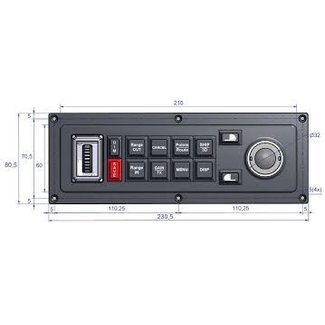


Furuno Remote Controls for Advanced NavNet MFD and Black Box Systems
Rain, sea water on the screen, cold hands or a moving boat can make touchscreen control slower exactly when the skipper needs quick access to charts, radar, sonar or menus. Furuno remote controls give compatible NavNet MFD and Black Box systems a physical control point, making key adjustments easier without reaching across the helm or depending only on touch input.
They are especially useful for flybridge stations, large dashboards, Black Box installations and multi-display setups, where the screen may be visible but not always comfortable to operate. Changing chart range, checking radar targets or switching sonar views becomes more controlled when the hand position is stable and the controller is placed where the skipper actually works.
For many Furuno users, a remote control is a cost-effective upgrade to helm ergonomics. It does not replace good navigation practice, but it can reduce awkward movement, improve control precision and make the existing NavNet system easier to use in the conditions where delays or missed information matter most.
See how the MCU006 adds physical control to compatible Furuno NavNet displays, making chart, radar, sonar and menu operation easier from the helm or flybridge.
Why use a remote control with a Furuno multifunction display?
A Furuno MFD remote control helps improve how the user operates the display in real navigation conditions. It gives the operator physical input through a rotary knob, buttons or dedicated control layout, depending on the model.
A remote control can be useful for:
- Wet screens or cold hands make touch control harder
- The display is visible but not within comfortable reach
- Boat movement makes precise touchscreen use frustrating
- Chart, radar or sonar adjustments need to be faster
- Black Box screens are not always practical to touch
- The helm works better with controls placed where the hand naturally rest
The value is simple: a remote control does not replace the MFD. It makes the display easier to control when touch input becomes slower, less precise or less ergonomic. For buyers investing in a Furuno NavNet setup, this is often a small addition that can make the whole helm feel more practical to use.
Which Furuno remote control is right for your NavNet system?
The right controller depends mainly on the Furuno display model and NavNet generation. Furuno remote controls are not universal, so compatibility should be checked carefully before purchase.
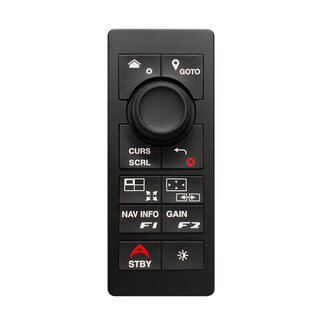
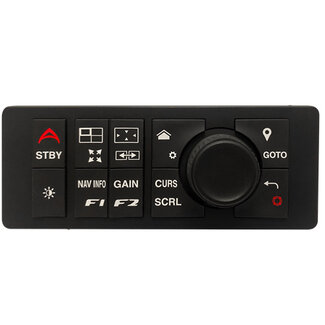
The Furuno MCU006 is the key option for current NavNet control setups, especially NavNet TZtouchXL and TZTBBX Black Box systems. It is available in vertical and horizontal versions, which makes it easier to match the controller to the dashboard layout, mounting position and natural hand movement at the helm.
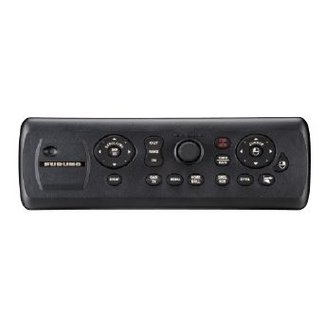
The Furuno MCU005 is more relevant for selected previous-generation Furuno systems and refits where the existing MFD or Black Box setup supports this controller. It should be chosen only after checking the exact display model, software version and connection requirements.
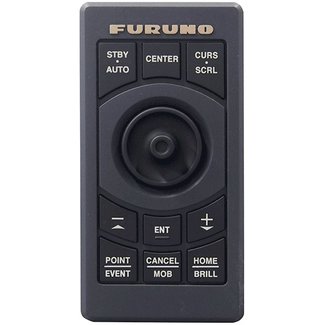
The Furuno MCU-004 is mainly relevant for specific older NavNet installations, including selected NavNet TZtouch and TZtouch2 systems. It should be treated as a compatibility-specific controller, not as a general replacement for newer remote controls.
The safest buying logic is simple: choose the remote control by exact MFD model, NavNet generation, software version and connection type, not only by the latest model. This avoids buying a unit that looks correct but does not match the installed Furuno system.
Why are remote controls important for Furuno Black Box systems?
Remote controls are especially useful with Furuno Black Box MFD systems. A Black Box setup does not work like a standard all-in-one display. The processor is installed separately and connected to an external marine monitor, often in a custom helm layout.
In these installations, the screen may be clearly visible but not always easy to touch. A remote control allows the operator to control the MFD interface from a more comfortable position.
This is especially useful for:
- Large helm stations and flybridge control positions
- Yachts and professional installations
- External marine monitors
- Flush-mounted screen layouts
- Multi-screen dashboards
- Installations where the monitor is mounted further away
- Users who want cleaner and more ergonomic control
For Black Box systems, a remote control can be more than a convenience. It can be a key part of making the whole installation practical to use.
Touchscreen or remote control: when does physical control make sense?
A touchscreen is still the most direct way to interact with an MFD, especially for simple gestures, visual selection and close-range operation. But physical control becomes valuable when conditions are less stable or the display is not always easy to reach.
A Furuno remote control is most useful when:
- The boat is moving and touch input feels less precise
- The display is mounted further away from the operator
- The user frequently adjusts chart range, radar view or sonar screens
- The helm layout includes large or multiple displays
- The boat is used in rain, cold conditions or with gloves
- The system uses a Black Box processor and external monitor
- The installation needs a cleaner control position
For many users, the best setup is not touchscreen or remote control. It is both: touch for direct interaction and physical control for precision, comfort and real helm conditions.
What should you check before buying a Furuno remote control?
Compatibility is the most important purchase factor. A Furuno remote control must match the correct NavNet display, Black Box setup and connection type.
Before buying, check:
- NavNet generation: choose MCU006 for current NavNet TZtouchXL and TZTBBX Black Box systems. For older TZtouch, TZtouch2 or TZtouch3 setups, check whether MCU005 or MCC-004 is the correct controller.
- Display setup: Black Box systems and large external monitor installations usually benefit most from a remote control, because the screen may be visible but not always easy to reach.
- Controller format: MCU006 is available in vertical and horizontal versions, so the choice should match the dashboard layout, mounting space and natural hand position at the helm or flybridge.
- Installation type: in a new Furuno setup, the controller can be planned into the helm layout from the start. In a refit, the priority is checking the existing display model, available mounting space and cable routing before choosing the controller.
- Control purpose: remote controls are most valuable when the user needs faster physical access to chart range, radar views, sonar screens and system menus, especially on moving boats or multi-display layouts.
Furuno remote controls should be treated as compatibility-specific control interfaces, not universal remotes. The right choice depends on the system already installed or the Furuno MFD setup being built.
Frequently Asked Questions About Furuno Remote Controls
- What does a Furuno remote control do?
A Furuno remote control provides physical control for compatible Furuno NavNet multifunction displays and Black Box systems. It can help operate charts, radar, sonar, menus and display functions without relying only on touchscreen input. - Do I need a remote control if my Furuno MFD has a touchscreen?
Not always. A remote control is most useful when the display is mounted further away, the helm has multiple screens, the boat uses a Black Box system, or the user wants more precise physical control while underway. - Which Furuno remote control works with TZtouchXL?
The Furuno MCU006 is the main remote control option for current NavNet TZtouchXL and TZTBBX Black Box systems. Exact compatibility should always be checked against the display model and system setup. - What is the difference between MCU006, MCU005 and MCC-004?
The MCU006 is mainly for current TZtouchXL and TZTBBX Black Box systems. The MCU005 is more relevant for selected TZtouch2, TZtouch3 and compatible Black Box installations. The MCC-004 is generally associated with certain older Furuno NavNet setups. - Are Furuno remote controls universal?
No. Furuno remote controls are not universal. They are matched to specific NavNet generations and their related products: MCU006 is for current TZtouchXL and TZTBBX Black Box systems, while MCU005 and MCC-004 are linked to selected older NavNet setups. This means buyers should choose the remote control by checking the exact MFD or Black Box system they have, not just by choosing any Furuno controller. - Are remote controls useful for Furuno Black Box systems?
Yes. Remote controls are especially useful for Furuno Black Box systems because the monitor may be mounted further away or integrated into a custom helm layout. A remote control gives the operator a more ergonomic way to control the MFD interface.
A Trusted Partner for Your Furuno Remote Control Setup
At Sail360, our focus goes beyond supplying marine electronics. Our goal is to help boat owners choose Furuno remote controls with confidence by offering the product knowledge, compatibility guidance and support needed before purchase.
We believe that a good control setup starts with matching the remote control to the right Furuno NavNet display, Black Box system, software version and helm layout.
Through Sail360, you’ll find:
- Carefully selected Furuno remote controls for compatible NavNet MFD and Black Box systems
- Practical guidance on MCU006, MCU005, MCC-004 and system compatibility
- Control solutions for large helms, refits, multi-display setups and external monitor installations
- Reliable products from trusted marine electronics manufacturers, including Furuno
Whether you are building a new Furuno helm, upgrading a Black Box installation, improving control at a secondary station or maintaining an existing NavNet setup, our team can help you check compatibility and choose with confidence.